How to Make the Toc Toc AI Hallway Dance Video
A practical guide to the Toc Toc AI video: where the hallway dance came from, its five beats, the photo to use, posting with the sound and filming it yourself.
5 min read · Updated
What the Toc Toc trend is
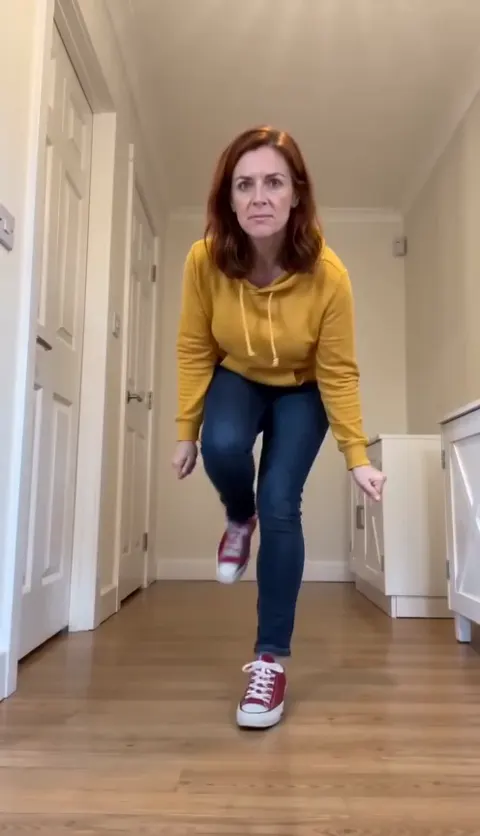
Toc Toc is a short dance clip set to a French party song of the same name. It all happens in one unbroken take in a plain hallway, with the phone lying on the floor and angled up, so every step looks huge as it comes toward the lens.
The routine came from a dancer who paired deliberately silly moves with a completely blank face. Other people started copying it at home, and that is how it turned into a trend. The AI version rebuilds the same take from one photo, so you don’t have to learn the steps or clear a hallway.
The five beats, in order
The clip lasts 11 seconds. Watch a few versions and you’ll spot the same five moments every time:
- 0:00: a stomping approach that ends right at the lens, face serious.
- 0:02: a bounce backwards so the whole body is in shot, one foot up.
- 0:04: a shrug with the palms turned up, the who’s-knocking moment.
- 0:06: a quarter turn to side-on and a run of hops, one heel flicked up behind.
- 0:10: a turn back to the camera, arms out wide, one knee raised. Ta-da.
The ta-da is the payoff, so it has to land on the song’s final beat. Everything before it is about keeping the bounce steady.
Making it from one photo
- Open the Toc Toc AI page and add a photo of yourself.
- Start the video. One video is $6.99, and packs of 4 or 12 bring the price per video down; see pricing.
- Wait about 3 minutes. You can leave the page, because we email you when it’s finished.
- Download the 11-second vertical file. The song is already on it, and there’s no watermark.
If a video fails, it goes back into your pack, so a bad run doesn’t cost you a video.
Choosing the best photo
- One face only, looking straight at the camera.
- Even, bright light: a window in front of you beats a lamp behind you.
- Nothing over the face, so no sunglasses, mask or hand in the way.
- Wear what you’d want to dance in. The clothes in the photo show up in the video.
- A selfie is fine. Group photo? Trim it until only one person is left.
Celebrity photos are refused, and please only upload someone who has said yes to it.
Posting it with the sound
The song is baked into your file, but TikTok and Reels group trend videos by the sound attached to each post. To land next to the others:
- Upload the video in TikTok or Instagram.
- Tap Add sound, search for Toc Toc and pick the trend’s version.
- Turn the original sound down so the two tracks don’t clash, then post.
Platforms sometimes mute the song on an upload. Adding the in-app sound is the fix.
Filming it yourself, without AI
If you’d rather dance it for real, the setup is simple:
- Set your phone down low at the end of a hallway, tipped slightly upward. A book or a rolled-up sock does the job.
- Begin at the opposite end, giving the approach room to grow in the frame.
- Play the song out loud from a second device and count yourself in.
- Clear the floor first. You’ll be watching the lens, not your feet.
- Land each hop with both feet under you; sliding looks wrong on camera.
- Hold a straight face until the ta-da, then let the grin out.
Questions
How long is the Toc Toc video?
11 seconds, vertical 9:16. That covers the routine from the first step to the ta-da.
Do I have to learn the routine?
Not for the AI version. Your photo is the only thing you add, and the steps are already timed to the song. To film it yourself, practise the five beats above.
Where does the phone go if I film it myself?
Low on the floor at the end of the hallway, tipped up slightly, while you begin at the opposite end.
Can I make one for a friend?
Yes, with their photo, as long as they’re happy with it. Celebrity photos are refused.